
Which product?
Beginner Level
| Product | Cost (rental) | Cost (ownership) | Use Case | Ideal Market | Platform |
|---|---|---|---|---|---|
| KlipDraw Basic | $89 per year | N/A | Draw on videos | Junior teams needing to simply illustrate their ideas to the team or player(s) | Windows, Mac |
| KlipDraw Animate | $160 per year | N/A | Draw and animation on videos | Advanced analysts needing a drawing tool to compliment their existing analysis software | Windows, Mac |
| Nacsport Basic | $165 per year | N/A | Ideal tool to begin in video analysis | Schools and clubs, junior level teams | Windows, Mac |
| Nacsport Tag & View | $120 per year | N/A | Analyse while filming, draw on video clips | For parents filming their children playing sport. Ideal for training sessions. | iOS iPhone or iPad |
Advanced Level
| Product | Cost (rental) | Cost (ownership) | Use Case | Ideal Market | Platform |
|---|---|---|---|---|---|
| KlipDraw Animate | $160 per year | N/A | Draw and animation on videos | Advanced analysts needing a drawing tool to compliment their existing analysis software | Windows, Mac |
| KlipDraw Motion | $395 per year | N/A | Draw, full motion illustrations, player tracking | Professional analysts needing a drawing tool to compliment their existing analysis software | Windows |
| Nacsport Basic Plus | $365 per year | $745 | An entry-level option that provides coaches with a deeper analysis | Schools and clubs, 1st team levels | Windows, Mac |
| Nacsport Scout | $790 per year | $1,795 | Advanced video analysis software | Elite schools, universities, semi-pro teams | Windows, Mac |
| Nacsport Tag & View | $120 per year | N/A | Multiple live tagging by group of analysts | Teamwork through local networks. Several analysts tagging from mobile devices feed data to a central computer for fast joint analysis. | iOS iPhone or iPad |
Expert Level
| Product | Cost (rental) | Cost (ownership) | Use Case | Ideal Market | Platform |
|---|---|---|---|---|---|
| KlipDraw Animate | $160 per year | N/A | Draw and animation on videos | Advanced analysts needing a drawing tool to compliment their existing analysis software | Windows, Mac |
| KlipDraw Motion | $395 per year | N/A | Draw, full motion illustrations, player tracking | Professional analysts needing a drawing tool to compliment their existing analysis software | Windows |
| Nacsport Pro | $1,390 per year | $3,570 | High-end analysis software aimed at professional analysts | Universities, professional teams | Windows, Mac |
| Nacsport Elite | $2,590 per year | $7,350 | Professional video analysis software for elite teams | Elite and top tier teams | Windows, Mac |
| Nacsport Tag & View | $120 per year | N/A | Multiple live tagging by group of analysts | Teamwork through local networks. Several analysts tagging from mobile devices feed data to a central computer for fast joint analysis. | iOS iPhone or iPad |
Nacsport HUB
Share uploaded work with coaches and players quickly and easily with Hub. Put your valuable insights into the hands of the people who need them most.
| Product | Cost (rental) | Plan Details | Platform |
|---|---|---|---|
| HUB40 | $475 per year | 40GB, 4 admins, 50 users | Windows, MAC, Online |
| HUB100 | $990 per year | 100GB, 10 admins, 100 users | Windows, MAC, Online |
| HUB300 | $2,350 per year | 300GB, 30 admins, 300 users | Windows, MAC, Online |
| HUB500 | $3,500 per year | 500GB, 50 admins, 500 users | Windows, MAC, Online |

Nacsport products comparison
The following table shows you the main functionalities of each of the video analysis products, to help you decide the version that is right for you. Click here.

Hardware and systems requirements
Computer hardware specifications, operating system requirements and capture devices needed for live coding. Click here.


Nacsport Tutorials
A list of video tutorials for a quick start as well as a complete playlist of all the video tutorials per product. Click here.
KlipDraw Tutorials
A playlist of all the video tutorials for KlipDraw range of products. Click here.
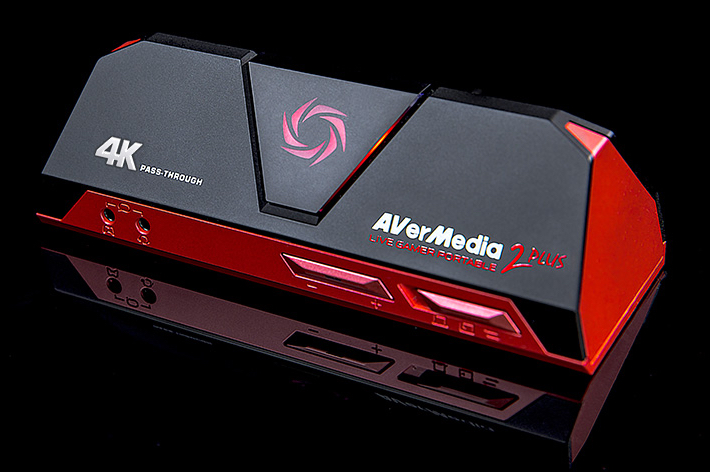
What is needed to code live games
The following video demonstrates how to use the video capture device (AverMedia) for coding live games. Click here.
 VIDEO ANALYSIS AFRICA